
Table
of Contents:
o
Intro
o
Key Concepts
o
Access Meeting Invites Outside of
Cloud Workspace
o
Connection Matrix
o
Access Meeting Invites Outside of
Cloud Workspace (When Required)
o
Troubleshooting Sound & Video

Intro:
The
proliferation of collaboration tools like Teams & Zoom, plus the mass adoption
of remote work, requires users have better comprehension of how sound,
microphones, and video work across different devices and different connectivity
scenarios. The guidance in this article is intended to provide the reader with
a high-level understanding of connection options available across different
device types.

Key Concepts:
Many
users will need to join meetings with more than one device. Here's a quick way
to think about it:
Single Device Participation:
o
Device
Requirements: Devices with built-in speakers,
microphones, and cameras
o
Examples: Laptops, Tablets & SmartPhones
o
Meeting
Requirements: Generally, only one device is
required
Multi-Device
Participation:
o
Device
Requirements: Devices lacking one or more required
technology (speakers, microphones, cameras)
o Examples: Desktop
PCs, NUCs which lack one or more required technology (speakers, microphones,
cameras)
o Meeting Requirements: Users
will join meetings in multiple ways
Connection Matrix:
Use
this chart to determine which options to consider when participating in an
event/meeting:
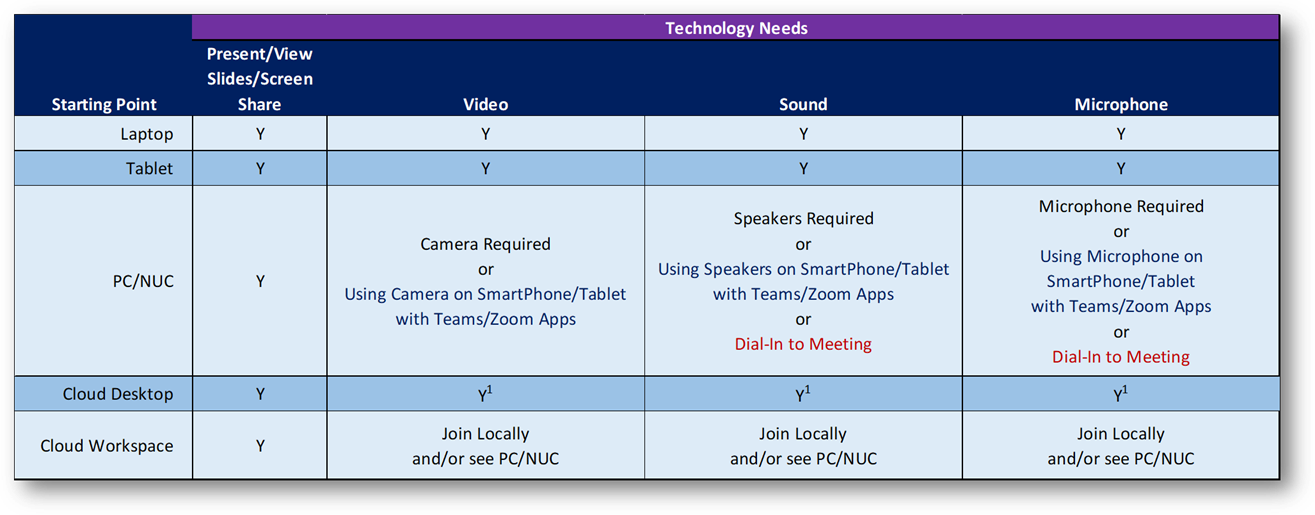
1 Full client connections only, not supported in the web
client. For Zoom compatibility in Cloud Desktop, a plug-in must be installed on
the host (local) PC. The plug-in is installed by default on MainFrameIT managed
desktops, Work-From-Home users can download
the plug-in here.
Access Meeting Invites Outside of Cloud Workspace (When Required):
For
meetings requiring a Cloud Workspace user join from their local desktop,
the following methods make it easy:
o
Use Outlook Web run from the
local desktop
o
Use the copy-link / paste-link
method
o
Click
here to learn more
o
Teams on Local Desktop:
o
Teams meetings can be joined from the default browser on most
Windows 10 PCs, Microsoft Edge:

o
The full Teams client can also be
installed/re-installed outside of Cloud Desktop/Workspace, Click Here.
Troubleshooting
General
Issues:
o
Teams
Sound
& Video:
o
Zoom
o
Teams
Copyright (C) 2021 All rights
reserved, MainFrameIT, LLC