

Phone
Setup Quick Reference:
In
most cases, your phone will be powered off the network cables and will not
require the included power adapter. In a standard configuration, the phone
will be connected between the wall jack and your PC.
Important: As the last
step in setup will turn the phone on, it's important that when the last step is
performed, the phone can then be set on a desk / surface, and left for a good
30 minutes. During this time the phone will restart multiple times as it works
it's way through final configuration steps.
To Setup Your Phone:
o
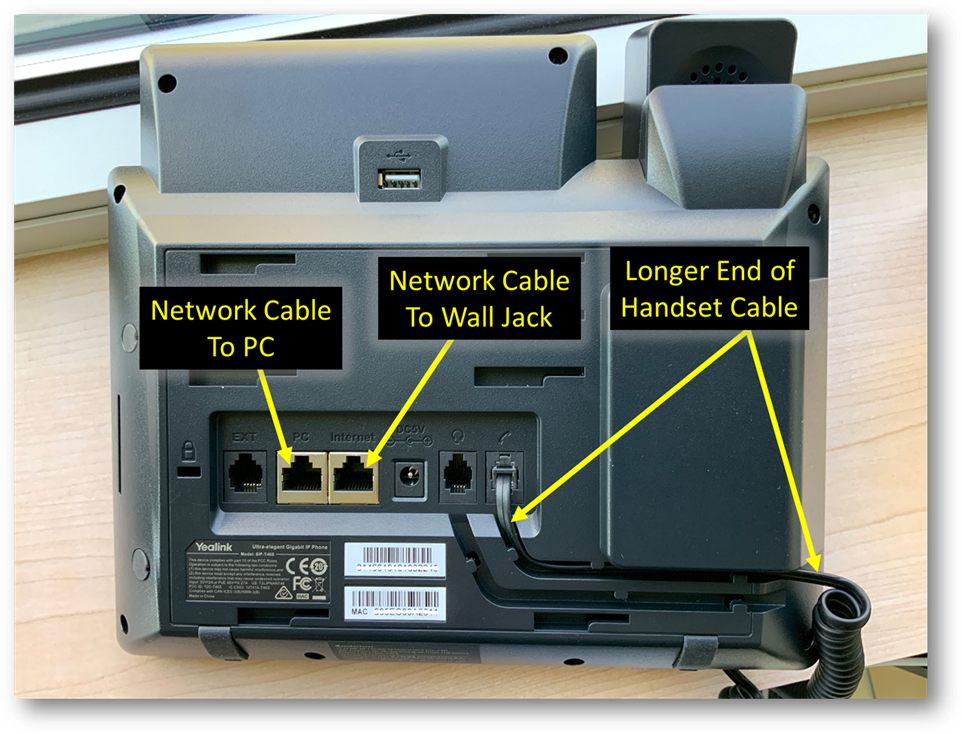
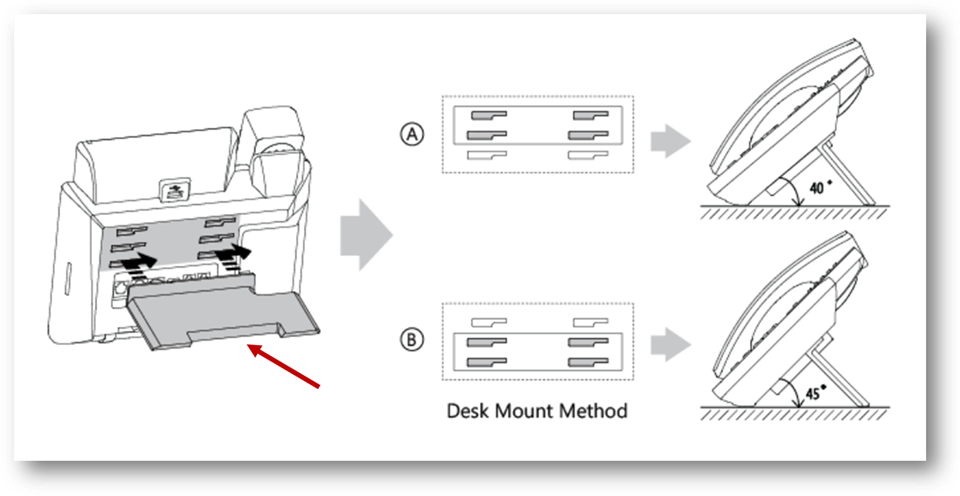
Setup the stand (scroll down) and
plug in your handset.
o
As shown in the screenshot directly
below, be sure the longer end of the coiled handset cable is used to connect
the handset to the bottom of the phone.
o
Unplug the existing network
cable from the back of the PC
o
On the phone, connect the included
network cable to the PC/'To PC' port as shown below
o
Connect the other end of this cable
to the back of the PC
o
Plug the network cable connected to
the wall into the Internet/'To Wall Jack' port on the phone as shown
below.
o
Set the phone on a desk / surface
and leave for a good 30 minutes. During the time, the phone will restart
multiple times.
Stand
Installation:
Copyright (C) 2021 All rights
reserved, MainFrameIT, LLC